Stack
Laravel 10, MySQL, Bootstrap 5, Vue.js 3, Tailwind CSS
Integrity
Zero Backdoors / Nulls
Included
Full Source & SQL
Delivery
Instant On-Demand
Architectural Overview & Highlights
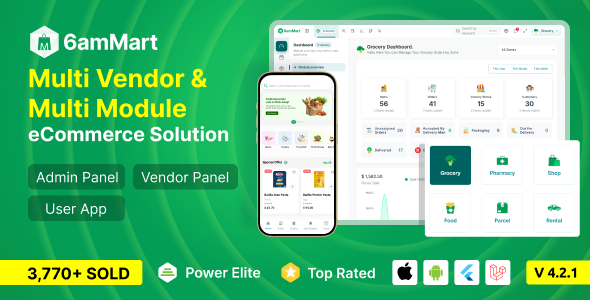
About 6ammart - Multi-Vendor Food & Grocery Delivery Marketplace
The 6ammart platform is a robust, Laravel‑powered multi‑vendor marketplace designed for food, grocery, and on‑demand delivery businesses. Its modular architecture separates vendor, admin, and customer panels, enabling seamless scaling and easy customization. Built with Bootstrap 5 and Vue.js, the UI is responsive, fast, and ready for mobile‑first experiences.
Targeted at startups, local chains, and enterprises, 6ammart supports multiple payment gateways, real‑time order tracking, commission management, and a powerful API for third‑party integrations. The script’s clean codebase follows PSR‑12 standards, includes comprehensive documentation, and can be deployed on any standard LAMP/LEMP stack within minutes, delivering immediate ROI through rapid market entry.
Key Technical Features & Functionality
Multi‑vendor marketplace with independent vendor dashboards
Real‑time order tracking, delivery assignment, and driver management
Multiple payment gateway integrations (Stripe, PayPal, Razorpay, etc.)
Commission & earnings management with flexible payout schedules
Advanced search, filters, and AI‑driven product recommendations
Responsive UI built with Bootstrap 5 and Vue.js 3 for mobile & desktop
Built‑in promotional tools: coupons, discounts, loyalty points
Extensive API & webhook support for mobile apps and third‑party services
PHP Scripts•Laravel 10, MySQL, Bootstrap 5, Vue.js 3, Tailwind CSS
6ammart - Multi-Vendor Food & Grocery Delivery Marketplace
$5.00Flat Rate
$59.00 EnvatoSave 92%
One-time payment • Lifetime commercial license • Zero fees
Package Contents:
Complete Untouched Source Code (Full ZIP)
Database SQL Schema & Sample Data
Step-by-Step Installation Documentation
Unlimited Domains & White-label Usage
On-Demand Verification by 217G Engineers
Payment: JazzCash, Easypaisa, Raast, USDT, Binance Pay & PayPal
Protected by 217G Escrow Buyer Guarantee
Developer Knowledge Base & Technical Documentation
Comprehensive Documentation & Setup Guides
Explore complete technical guides covering installation, system requirements, performance benchmarks, customization methods, and troubleshooting.
Verified for 2026 Deployment•100% Tested Instructions
Type: INSTALLATION
6ammart - Multi-Vendor Food & Grocery Delivery Marketplace - Complete Installation & Setup Guide on cPanel & VPS (2026)
6ammart – Multi‑Vendor Food & Grocery Delivery Marketplace
Complete Installation & Setup Guide on cPanel & VPS (2026)
Note: This guide assumes you have a fresh Linux server (CentOS 9 / Ubuntu 22.04) or a cPanel account with SSH access. All commands are shown for Ubuntu; adapt the package manager (
yum/dnf) for CentOS where needed.1. Server Requirements Checklist
| Requirement | Minimum Spec | Recommended |
|---|---|---|
| OS | Ubuntu 20.04 LTS / CentOS 8 | Ubuntu 22.04 LTS / AlmaLinux 9 |
| Web Server | Apache 2.4 or Nginx 1.18 | Nginx 1.22 (HTTP/2) |
| PHP | 8.1 | PHP 8.2 |
| PHP Extensions | pdo_mysql, mbstring, openssl, fileinfo, tokenizer, json, curl, zip, gd | Same + bcmath, intl |
| Database | MySQL 5.7 / MariaDB 10.3 | MySQL 8.0 / MariaDB 10.6 |
| Node.js | 16.x | 20.x (LTS) |
| Composer | 2.3+ | Latest |
| RAM | 2 GB | 4 GB+ |
| Disk | 5 GB (SSD) | 10 GB+ (SSD) |
| SSL | Let’s Encrypt (free) | Let’s Encrypt or paid cert |
SEO Tip: Hosting on a server located near your target audience reduces latency, which Google treats as a positive ranking factor.
2. Preparing the Environment
2.1. Update System Packages
bash
sudo apt update && sudo apt upgrade -y2.2. Install Required Packages
bash
# PHP 8.2 and extensions
sudo apt install -y php8.2 php8.2-fpm php8.2-mysql php8.2-mbstring php8.2-xml php8.2-curl php8.2-zip php8.2-gd php8.2-bcmath php8.2-intl

# Web server (choose one)
sudo apt install -y nginx   # or: sudo apt install -y apache2

# Database
sudo apt install -y mysql-server

# Node.js (LTS)
curl -fsSL https://deb.nodesource.com/setup_20.x | sudo -E bash -
sudo apt install -y nodejs

# Composer
php -r "copy('https://getcomposer.org/installer', 'composer-setup.php');"
php composer-setup.php --install-dir=/usr/local/bin --filename=composer
rm composer-setup.php
2.3. Verify Versions
bash
php -v
nginx -v   # or apache2 -v
node -v
npm -v
composer -V
mysql --version
3. Database Creation
- 1Log into MySQL as root:
bash
sudo mysql -u root -p- 1Create a dedicated database and user:
sql
CREATE DATABASE sixammart CHARACTER SET utf8mb4 COLLATE utf8mb4_unicode_ci;
CREATE USER 'sixammart_user'@'localhost' IDENTIFIED BY 'StrongP@ssw0rd!';
GRANT ALL PRIVILEGES ON sixammart.* TO 'sixammart_user'@'localhost';
FLUSH PRIVILEGES;
EXIT;
Note: Use a strong password and store it securely (e.g., in
.env).4. Deploying the Source Code
4.1. Obtain the Clean, Untouched Source
Developers can order the verified clean source code with instant on‑demand delivery for a flat $5.00 rate via 217G. Once you receive the zip file, upload it to your server.
4.2. Extract and Set Permissions
bash
# Assuming the zip is in /home/username/
cd /home/username/
unzip sixammart.zip -d /var/www/sixammart
cd /var/www/sixammart

# Set ownership to the web user (www-data for Ubuntu)
sudo chown -R www-data:www-data .

# Apply recommended permissions
find . -type f -exec chmod 664 {} \;
find . -type d -exec chmod 775 {} \;
chmod -R 775 storage bootstrap/cache
SEO Tip: Restrict write permissions to only
storage and bootstrap/cache. This prevents unauthorized file modifications that could affect crawlability.5. Composer & NPM Build
bash
# Install PHP dependencies
composer install --optimize-autoloader --no-dev

# Install Node dependencies
npm ci

# Compile assets (Tailwind + Vue)
npm run prod
If you are on a cPanel shared host without SSH, you can use the Terminal feature or run the same commands locally, then upload the compiled public/ folder via FTP.
6. Environment Configuration
Copy the example env file and edit the database credentials:
bash
cp .env.example .env
nano .env
Key entries:
COMMAND
APP_NAME="6ammart"
APP_ENV=production
APP_KEY= # generate with: php artisan key:generate
APP_DEBUG=false
APP_URL=https://yourdomain.com

DB_CONNECTION=mysql
DB_HOST=127.0.0.1
DB_PORT=3306
DB_DATABASE=sixammart
DB_USERNAME=sixammart_user
DB_PASSWORD=StrongP@ssw0rd!

CACHE_DRIVER=file
QUEUE_CONNECTION=sync
SESSION_DRIVER=file
Generate the application key:
bash
php artisan key:generateRun migrations and seed the demo data (optional but useful for testing):
bash
php artisan migrate --force
php artisan db:seed --class=DemoDataSeeder --force
7. Web Server Configuration
7.1. Nginx (Recommended)
Create a new site file:
bash
sudo nano /etc/nginx/sites-available/sixammart.confnginx
server {
    listen 80;
    server_name yourdomain.com www.yourdomain.com;
    root /var/www/sixammart/public;

    index index.php;
    charset utf-8;
    client_max_body_size 100M;

    location / {
        try_files $uri $uri/ /index.php?$query_string;
    }

    location ~ \.php$ {
        include fastcgi_params;
        fastcgi_pass unix:/var/run/php/php8.2-fpm.sock;
        fastcgi_param SCRIPT_FILENAME $realpath_root$fastcgi_script_name;
        fastcgi_intercept_errors on;
        fastcgi_buffer_size 16k;
        fastcgi_buffers 4 16k;
    }

    location ~ /\.(?!well-known).* {
        deny all;
    }

    # SSL (Let’s Encrypt)
    listen 443 ssl http2;
    ssl_certificate /etc/letsencrypt/live/yourdomain.com/fullchain.pem;
    ssl_certificate_key /etc/letsencrypt/live/yourdomain.com/privkey.pem;
    include /etc/letsencrypt/options-ssl-nginx.conf;
    ssl_dhparam /etc/letsencrypt/ssl-dhparams.pem;
}
Enable the site and reload Nginx:
bash
sudo ln -s /etc/nginx/sites-available/sixammart.conf /etc/nginx/sites-enabled/
sudo nginx -t && sudo systemctl reload nginx
7.2. Apache (If you prefer)
Create a virtual host:
bash
sudo nano /etc/apache2/sites-available/sixammart.confapache
<VirtualHost *:80>
    ServerName yourdomain.com
    ServerAlias www.yourdomain.com
    DocumentRoot /var/www/sixammart/public

    <Directory /var/www/sixammart/public>
        Options Indexes FollowSymLinks
        AllowOverride All
        Require all granted
    </Directory>

    ErrorLog ${APACHE_LOG_DIR}/sixammart_error.log
    CustomLog ${APACHE_LOG_DIR}/sixammart_access.log combined
</VirtualHost>
Enable modules and the site:
bash
sudo a2enmod rewrite
sudo a2ensite sixammart
sudo systemctl reload apache2
Note: After enabling SSL with Certbot (
sudo certbot --apache or --nginx), ensure Redirect rules force HTTPS to avoid duplicate content.8. Common Installation Pitfalls & How to Fix Them
| Symptom | Likely Cause | Fix |
|---|---|---|
| 500 Internal Server Error | Incorrect file permissions or missing .env | Verify chmod 775 on storage and bootstrap/cache. Ensure .env exists and APP_KEY is set. |
| SQLSTATE[HY000] [2002] Connection refused | Database credentials wrong or MySQL not running | Check .env DB values. Run sudo systemctl status mysql. |
| Asset not loading (CSS/JS) | npm run prod not executed or public folder missing | Re‑run npm ci && npm run prod. Confirm public/css and public/js exist. |
| CSRF token mismatch | Cache driver mis‑configured | Set CACHE_DRIVER=file in .env and clear cache: php artisan cache:clear. |
| Search engines not indexing | robots.txt blocking / or meta robots=noindex in blade templates | Edit public/robots.txt to allow crawling, remove noindex tags. |
| Slow page loads | No OPcache or outdated PHP version | Enable OPcache (sudo apt install php-opcache) and ensure PHP 8.2+. |
SEO Tip: After a fresh install, run a site crawl (e.g., Screaming Frog) to confirm that all canonical URLs resolve and that there are no duplicate content issues caused by trailing slashes.
9. Post‑Installation Checklist
- 1SSL Activation – Use Let’s Encrypt (
certbot) and force HTTPS. - 2Cache Warm‑up – Run
php artisan config:cacheandphp artisan route:cache. - 3Queue Workers – If you enable background jobs (order emails, push notifications), start a supervisor process:
bash
   sudo apt install -y supervisor
   sudo nano /etc/supervisor/conf.d/sixammart-worker.conf
ini
   [program:sixammart-worker]
   process_name=%(program_name)s_%(process_num)02d
   command=php /var/www/sixammart/artisan queue:work --sleep=3 --tries=3
   autostart=true
   autorestart=true
   numprocs=2
   redirect_stderr=true
   stdout_logfile=/var/log/sixammart/worker.log
bash
sudo supervisorctl reread && sudo supervisorctl update- 1Cron Job – Add Laravel scheduler:
bash
* * * * * www-data php /var/www/sixammart/artisan schedule:run >> /dev/null 2>&1- 1Backup Strategy – Schedule daily
mysqldumpand file system snapshots.
10. Frequently Asked Questions
Q1. Can I run 6ammart on a shared cPanel host without root access?
A: Yes. Use cPanel’s File Manager or FTP to upload the zip, extract it into public_html, and run Composer via the Terminal feature (or locally and upload the vendor folder). Set permissions to 775 for storage and bootstrap/cache. For the web server, Apache is already configured by cPanel; just ensure .htaccess is present.
Q2. How do I switch from Apache to Nginx on a VPS without downtime?
A: Install Nginx alongside Apache, configure the Nginx block as shown in section 7.1, then stop Apache (sudo systemctl stop apache2) and start Nginx (sudo systemctl start nginx). Verify DNS points to the same IP and run a quick curl -I https://yourdomain.com to confirm the response header shows nginx.
Q3. What is the best way to secure the admin panel from bots?
A:
- 1Enable HTTP Basic Auth on the
/adminroute via Nginx or Apache. - 2Install a reCAPTCHA plugin (Laravel‑reCAPTCHA) on the login form.
- 3Limit login attempts using Laravel’s ThrottleRequests middleware.
- 4Regularly rotate the
APP_KEYand keep the.envfile outside the web root (e.g., `/etc/6ammart/.env
Instant On-Demand Fulfillment
Get the Full Clean Source Code for 6ammart - Multi-Vendor Food & Grocery Delivery Marketplace
Order now for only $5.00 flat. Receive the complete untouched ZIP archive and database SQL within minutes.