Valorant Sensitivity Converter
Convert your sensitivity between Valorant, CS2, Apex Legends, Overwatch 2 and Rainbow Six Siege — enter your game, sensitivity and DPI to see the equivalent in every game plus your cm/360.
Direct Answer: Same Feel, Different Number
Pick the game your sensitivity is from, enter the sensitivity and your mouse DPI. The converter rescales it by the yaw ratio between the games, so the physical mouse travel for a full turn stays identical.
Calculator
Your sensitivity is from
In-game sensitivity
Mouse DPI
Enter your game, sensitivity and DPI to see the converted sensitivities.
This calculator stores no account data and states no price. It only does maths on the numbers you enter.
Frequently Asked Questions
What does this Valorant sensitivity converter work out?
It converts a sensitivity you enter in one game into the equivalent sensitivity in other FPS games, so your mouse travels the same physical distance for a full turn. It uses the games' yaw values — degrees turned per mouse count — and your own DPI. It never looks up accounts or settings.
What is cm/360 and why does it matter?
cm/360 is the centimetres your mouse must travel for your view to turn a full 360 degrees. Two sensitivities in different games feel the same when their cm/360 matches, even though the numbers look different.
Are the yaw values official?
No. Studios do not publish yaw values; the numbers used here are community-measured and widely used by converter tools. If a converted sensitivity feels off after a game update, check the value in-game and fine-tune from there.
Does this cover scoped or ADS sensitivity?
No. These conversions are for hipfire sensitivity only. Scoped and ADS multipliers work differently in each game, so convert those separately in-game.
217G Verified Escrow Hub
Verified Gaming Accounts Ready for Instant Handover
Finished calculating your stats? Explore verified PUBG Mobile, 8 Ball Pool, and high-tier competitive accounts secured with 100% Escrow buyer protection.
Escrow Safe
Verified
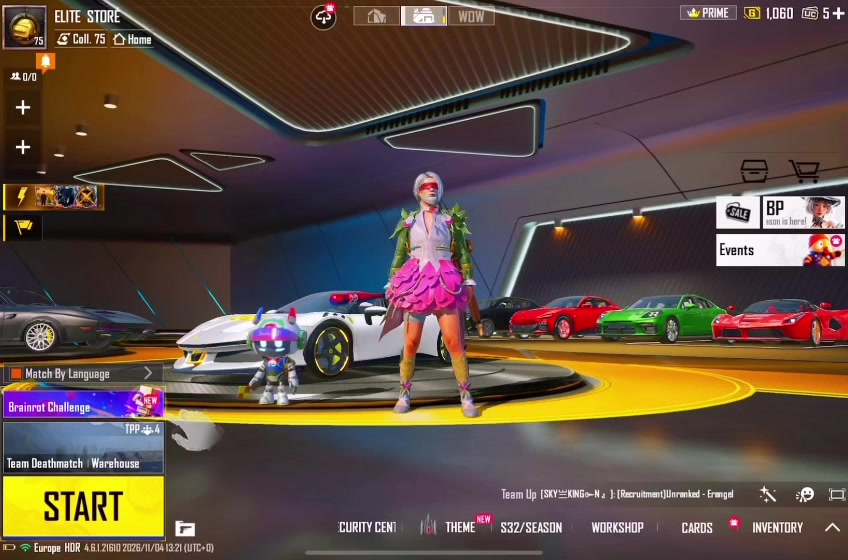
X-SuitMythic Fashion
🔥 COLLECTION LVL 75.8 | 2X X-SUITS | 14 MYTHICS | 6X SUPERCARS
PricePKR 297,000
View Deal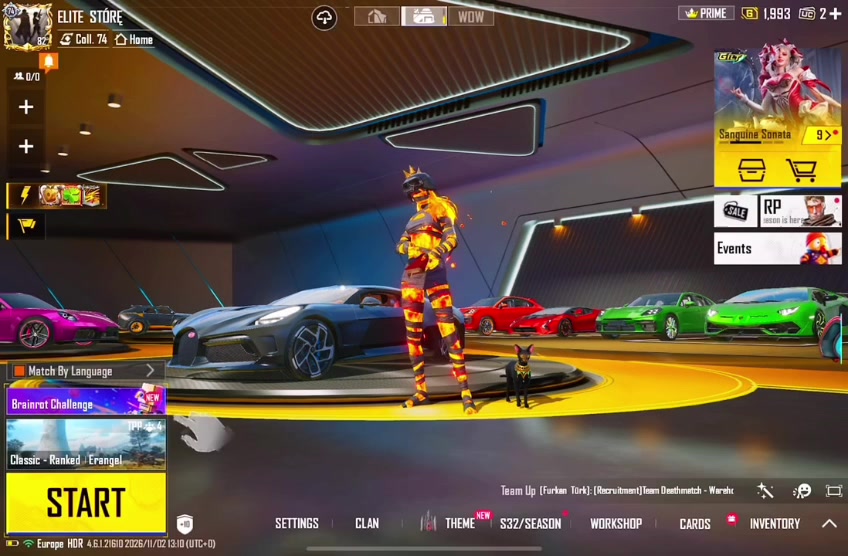
Escrow Safe
Verified
Lab GunMythic Fashion
COLLECTION LVL 74.5 | 242 MYTHICS | 70+ LAB GUNS | 10X SPORTS CARS | INFERNO HELMET 🔥
PricePKR 231,000
View Deal
Escrow Safe
Verified
X-SuitMythic Fashion
COLLECTION LVL 71.7 | 182 MYTHICS | FROST X-SUIT 5-STAR | 4X SPORTS CARS 🔥
PricePKR 165,000
View Deal
Escrow Safe
Verified
X-SuitLab GunMythic Fashion
COLLECTION LVL 85 | 441 MYTHICS | 135X LAB GUNS | 33 ULTIMATES | ARCANE X-SUIT 🔥
PricePKR 550,000
View DealNeed a specific skin or budget? Chat directly with an authorized Escrow Admin.
217G Verified Escrow Hub
Ready to Buy, Sell, or Audit a Gaming Account?
Explore 500+ verified PUBG Mobile accounts with Glacier M416, get an instant 10-minute valuation to sell your ID, or run forensic scam checks on middlemen.