Home Mode • Design • Roommates • Updated November 2026
PUBG Mobile Home Mode Guide 2026: Design, Roommates, Levels & Space
Home Mode is PUBG Mobile's quiet corner: a private island you build, decorate and show off, far from the battleground. This guide covers pubg mobile home design from the ground up — how Home works, what Prosperity does, how to level up, the Home Shop and its coins, the Home Competition, the pubg mobile roommate system, the verified design styles, pubg modern home design ideas that stay inside the game's real mechanics, what a pubg mobile space is, and the pubg mobile space name trick players actually mean when they search that phrase — with the facts, not invented prices or invented level caps.
Direct answer: Home Mode launched in PUBG Mobile v3.1 (March 2024) and lives in the WOW tab of mode selection. You get a private island to build on, and Prosperity is the key metric — levelling up increases your plot size and unlocks more items. You level up through missions and commissions plus Home Coins, via the Level button at the top-left or the butler in Management mode. Roommates need a Level 15 Home, a completed Home tutorial, a Connection and over 300 Synergy. And there is no verified maximum Home level — “pubg home design level 30” means the high-level homes players search for, not a confirmed cap.
What is PUBG Mobile Home Mode?
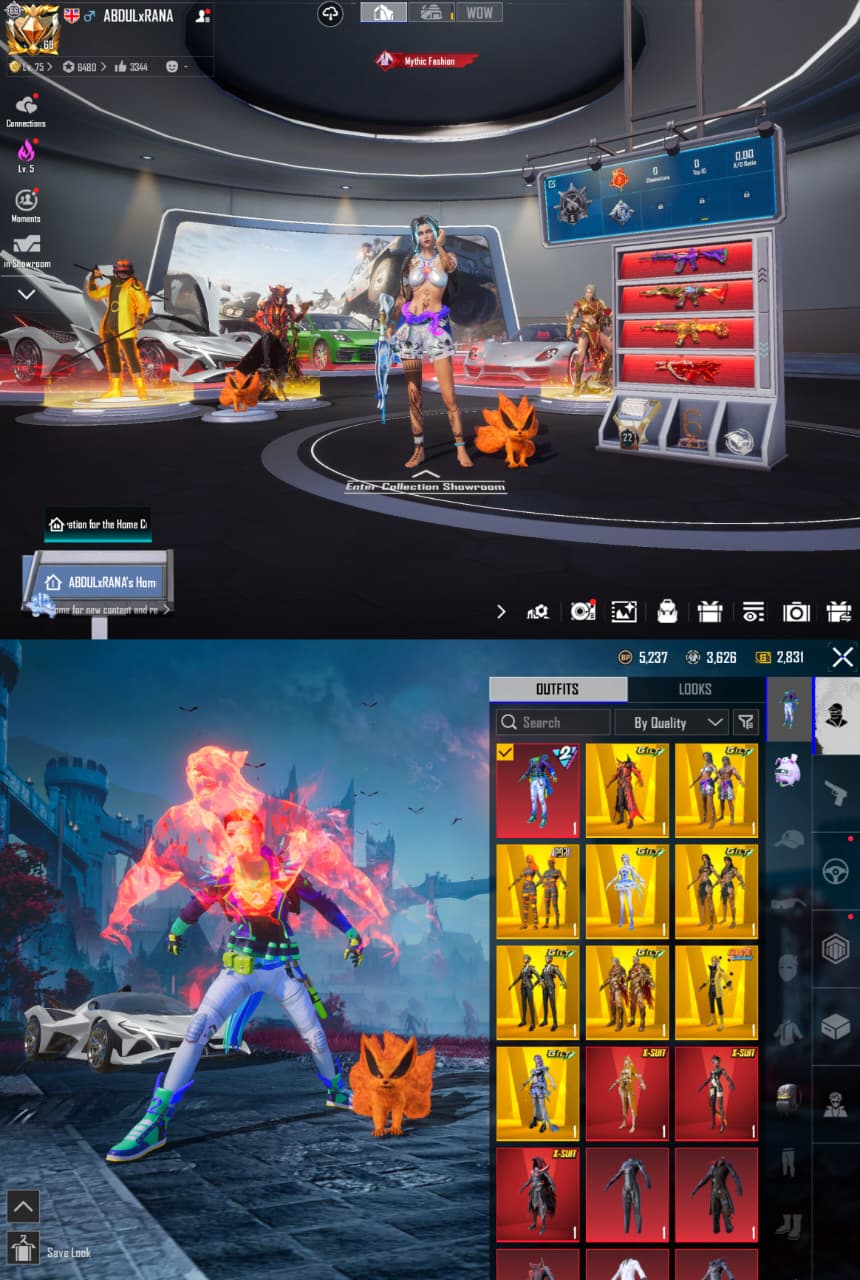
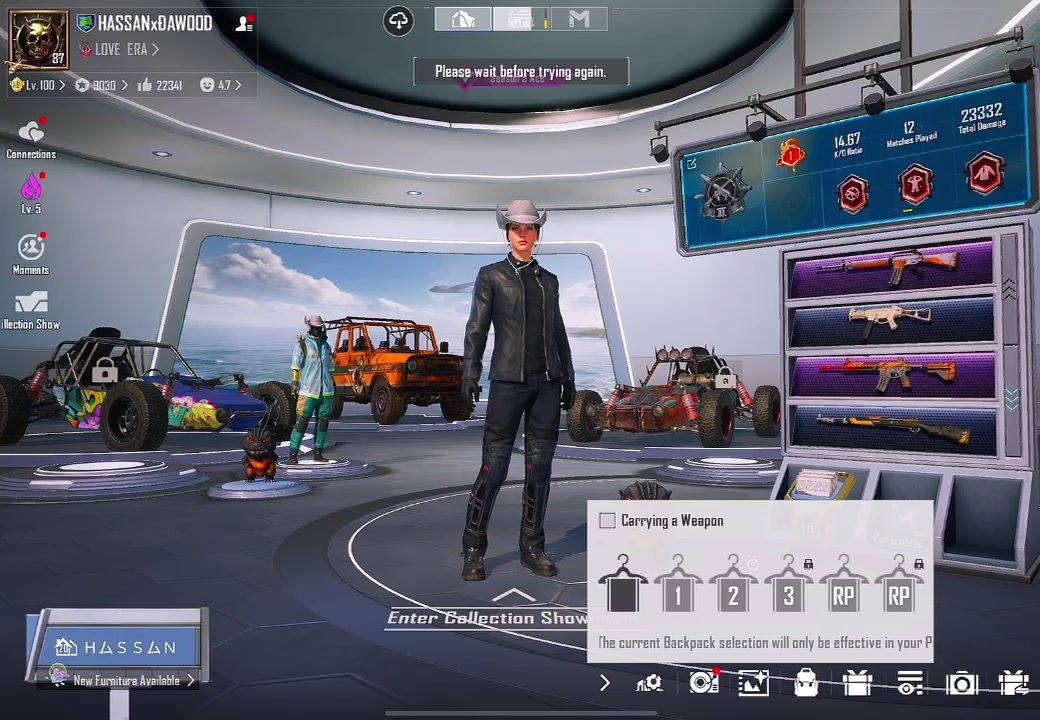
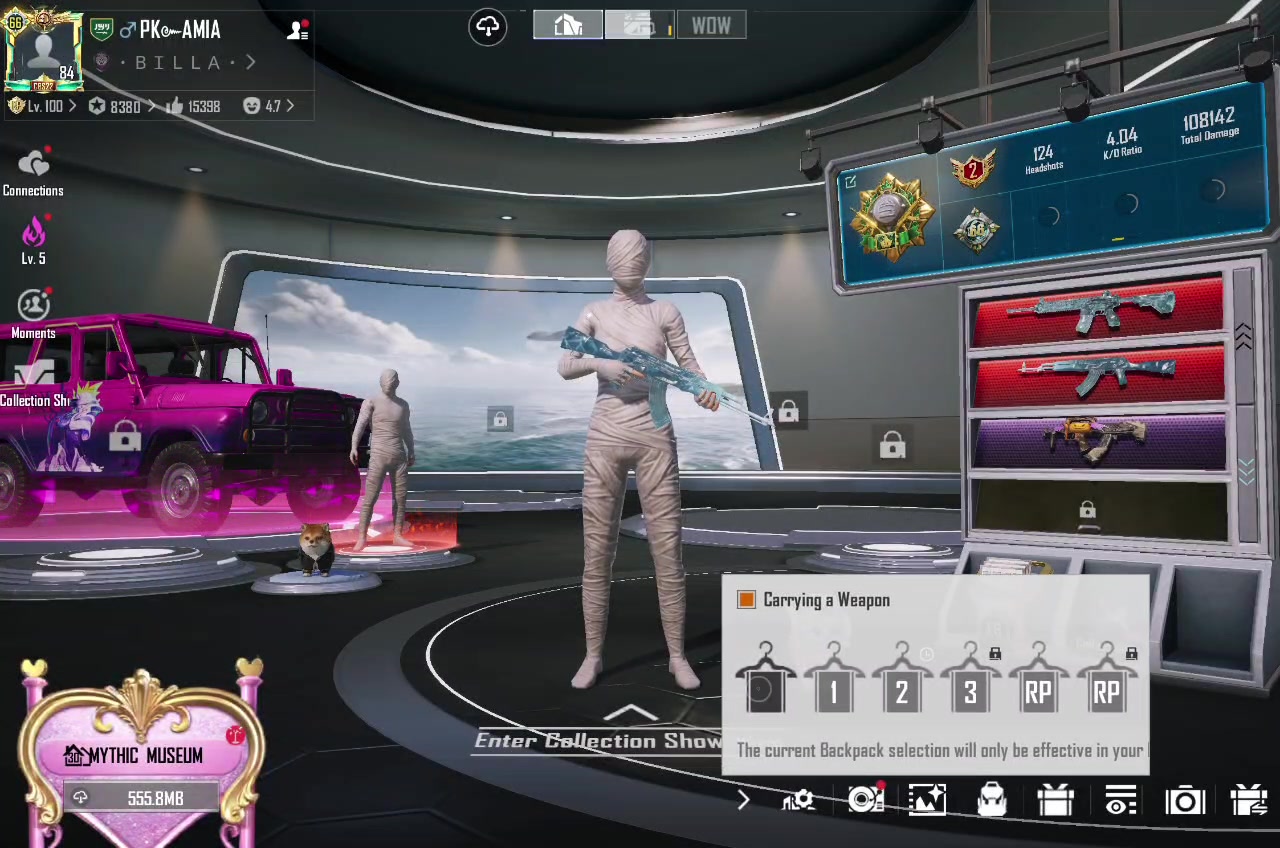
Home Mode arrived with PUBG Mobile v3.1 in March 2024, and you find it in the WOW tab of mode selection. It gives you a private island to build on — your own plot, your own buildings and furniture, and a space other players can visit. That island is also called your pubg mobile space: the v4.1 update notes call Home your “Home Space”, and homes can be visited via home codes typed into the search bar. So when a player talks about their “space” in the Home sense, they mean this island — not their character name, which is a different search covered below.
The heart of the mode is Prosperity. Prosperity is the number that measures how built-up your Home is, and it is the key metric for almost everything else in the mode: levelling up your Home increases your plot size and unlocks more items, and you need 200+ Home Prosperity just to register for the Home Competition. A good pubg home design is therefore not only about looks — every item you place feeds the Prosperity that unlocks the next stage of your island.
Home also comes with a free helper: a butler named Leon. Leon is free, and you can reach Management mode through him — including the level-up route described in the next section. There is also a Home Lucky Spin, a chance-based route to extra items, and the Home Shop in Cheer Park, where the mode's two currencies are spent.
PUBG mobile home design: how to level up and grow Prosperity
The question behind most pubg mobile home design searches is a practical one: how do I make my home bigger and better? The answer is levelling up. You level up via missions and commissions, plus Home Coins. Tap the Level button at the top-left of the Home screen, or go through the butler in Management mode. Each level raises your Prosperity, increases your plot size and unlocks more items — so the loop is simple: complete missions and commissions, spend Home Coins, place items, watch Prosperity rise, and level up again.
Two currencies run the mode: Basic Home Coins and Premium Home Coins. Both are spent in the Home Shop in Cheer Park. This guide does not state a price in coins or UC for any specific item, because item prices vary and any fixed figure would be out of date — check the Home Shop in-game for what an item costs right now. The same caution applies to the Home Lucky Spin: it is a chance-based way to get extra items, including some styles, so treat it as a bonus route rather than a guaranteed way to get a specific piece.
A design habit follows directly from the mechanics. Because Prosperity is the key metric and levelling up unlocks plot size and items, the homes that progress fastest are the ones that keep placing items and completing missions and commissions — a half-empty island stalls, while a filled one keeps unlocking. And because the Home Competition is decided by votes, a home that reads well at a glance — a clear theme, a tidy layout — has an edge over a cluttered one with the same Prosperity.
Home Competition: 200 Prosperity, 10 rounds, votes decide
The Home Competition is where pubg home design gets judged. To register you need 200+ Home Prosperity — so a new, empty island cannot enter. Once registered, you are matched against homes of similar prosperity every 3 days for 10 rounds, and votes decide each face-off. Home Points raise your Home Face-Off Level, which gives better rewards.
The practical takeaway is that the competition rewards two things at once: the Prosperity that gets you in and matched fairly, and the presentation that wins votes. A coherent style — one of the verified themes below, carried through the whole island — photographs better in a face-off than a mix of everything you own. If your home is below 200 Prosperity, the competition is not the next step; missions, commissions and Home Coins are.
PUBG mobile roommate: sharing a Home
The pubg mobile roommate system arrived in v3.6 on 9 January 2026, and it lets two players share one Home. The requirements are specific, and all of them have to be met: the applicant needs a Level 15 Home, and the invitee must have completed the Home tutorial. Both players need a Connection and over 300 Synergy. Meet those, and the roommate arrangement creates a shared Home.
Two limits are worth knowing before you invite anyone. First, only one roommate is allowed at a time — this is a pair, not a group house. Second, leaving restores the applicant's original solo Home, so the shared Home is not a one-way change: if the arrangement ends, the applicant gets their own island back as it was. That makes the roommate system a low-risk way to build together — a friend can move in, decorate with you, and leave without either of you losing your own Home.
If you are still short of the requirements, the path is the same loop as the rest of the mode: raise the applicant's Home to Level 15 through missions, commissions and Home Coins, make sure the invitee has finished the Home tutorial, and build up your Connection and Synergy past 300 before sending the invite.
Verified Home styles: what you can actually build
A pubg mobile home design starts with a style, and the verified styles are the ones tied to real updates — not a list invented for this page. These are the ones confirmed:
- Ancient Capital — v3.2, available 18–31 May 2024, requires Home Level 3.
- Sylvan Mystique — v3.6, from 9 January 2026.
- Romantic Promise — from 14 February 2026.
- Maple Courtyard Palace — v3.4, unlockable at Home stage 5.
- Polar Wonderland and Esports Room themes — v4.1.
- Bronzework Bastion — v3.8, available via the Home Lucky Spin and the Shop, with Style Points earned via Prosperity.
Two things follow from that list. First, styles are gated by level, stage and Prosperity — Ancient Capital needs Home Level 3, Maple Courtyard Palace needs Home stage 5, and Bronzework Bastion's Style Points come from Prosperity — so levelling up is what opens the catalogue, not just what enlarges the plot. Second, this guide does not invent item names or prices for any style: if a style's exact furniture set or cost is not listed here, it was not verified, and the in-game Home Shop is the place to check.
PUBG modern home design: the modern look, built from real mechanics
A pubg modern home design means a clean, contemporary build: clean lines, glass, and minimal furniture — open space, a few strong pieces, and nothing cluttered. A pubg modern house in this sense is a style choice, not a separate mode or a named in-game style: there is no verified “Modern” style pack in the list above, so this section treats “modern” as a design approach you apply with the styles and items the game actually offers.
The approach works because it fits the mechanics. A minimal layout with clean lines photographs well in a Home Competition face-off, where votes decide — and the same restraint keeps Prosperity visible rather than buried under clutter. Three grounded tips: pick one verified style as your base and carry it through the whole island instead of mixing themes; leave open space so the plot reads bigger than it is, which matters more as levelling up increases your plot size; and spend your Home Coins on a few pieces that fit the theme rather than many that do not, since every placed item feeds Prosperity either way. No invented item names or prices are given here — check the Home Shop in Cheer Park for the pieces that fit your theme right now.
If you want inspiration before you build, visit other homes with a home code from the search bar and look at how high-Prosperity players lay out their islands. A visited home is the best reference for a modern build, because you can see the plot, the spacing and the style working together instead of reading about them.
PUBG mobile space name: the username-with-spaces trick
Here is an honest correction that matters: the dominant search intent behind “pubg mobile space name” is not Home at all. It is the username trick — how to put a space in your PUBG Mobile character name. Players searching for a pubg mobile space name usually want a name like “John Doe” with a visible gap between the words, and this section answers that search directly rather than pretending it is about Home.
PUBG Mobile does not allow plain spaces in character names. Players fake the space with invisible or special characters — for example 「 」 or ・ — placed between the words, so the name looks spaced even though no real space character is there. Changing your name needs a Rename Card. Rename Cards are free from level-up rewards, and the in-game shop also sells them for UC — sources quote 150–180 UC, so this guide presents that as a disputed range and does not pick one number as fact. You can only rename once per day, so check the result before you confirm it.
To keep the two meanings straight: your pubg mobile space is your Home Space, the island you build; a “space name” is a character name with a faked space in it. They share a word and nothing else — and if you came here for the name trick, the answer above is the whole of it. For more on names and accounts, see our PUBG Mobile account stats guide and how to buy a PUBG Mobile account safely.
PUBG home design level 30: what high-level homes really unlock
The search “pubg home design level 30” is one this guide answers with a plain statement: no verified maximum Home level was found. This guide does not claim that 30 is the cap or the maximum level, and it does not claim any other number is the cap either. If an official level cap is published, this page will be updated — until then, any page that states a maximum level as fact is guessing.
What “level 30” does usefully mean is a high-level home: the kind of pubg home design players search for when they want to see what a well-developed island looks like. A high-Prosperity, high-level home has a bigger plot and more unlocked items and styles — the same rewards levelling up gives at every stage, carried further. The styles above show the shape of that progression: Ancient Capital at Home Level 3, Maple Courtyard Palace at Home stage 5, Bronzework Bastion's Style Points earned via Prosperity. A home at a high level is simply further along that same road, with more room, more items and more styles to build with.
So the honest way to read the phrase is as a target, not a ceiling: build Prosperity through missions, commissions and Home Coins, level up through the Level button or the butler, and your island keeps growing — plot, items and styles alike — with no verified cap to stop at.
Buying an account with a developed Home (26 November 2026)
Building a high-Prosperity Home takes seasons of missions and commissions; buying an account inherits whatever Home, collection and cosmetics are already on it. As of 26 November 2026, 217G has 144 AVAILABLE published listings across 138 accounts, with a median account price of Rs 80,750. PUBG Mobile accounts number 129, with a median price of Rs 79,500 — from the cheapest PUBG account, #5398 at Rs 7,000, to the top PUBG account, #5319 at Rs 2,860,000. Free Fire accounts number 11, priced from Rs 6,000 to Rs 468,000. There is 1 live TikTok account, #5212 at Rs 9,000. 217G sells no 8 Ball Pool or Instagram accounts. If you buy for the Home, ask to see the account's Home level and Prosperity on a live screen share before you pay — a high-level Home is worth checking, not assuming. Read how to buy a PUBG Mobile account safely before you pay anything, and see our PUBG Mobile collection level guide for how collection value is judged.
Frequently Asked Questions
What is PUBG Mobile Home Mode?
Home Mode launched in PUBG Mobile v3.1 (March 2024) and is found in the WOW tab of mode selection. It gives you a private island to build on. Prosperity is the key metric: levelling up your Home increases your plot size and unlocks more items. Home is also called your Home Space, and other players can visit your home using a home code entered in the search bar.
How do I level up my Home in PUBG Mobile?
You level up by completing missions and commissions and by spending Home Coins. Tap the Level button at the top-left of the Home screen, or talk to the butler in Management mode. Levelling up raises your Prosperity, increases your plot size and unlocks more items and styles.
What are the requirements for a PUBG Mobile roommate?
Roommates arrived in v3.6 (9 January 2026). The applicant needs a Level 15 Home, and the invitee must have completed the Home tutorial. Both players need a Connection and over 300 Synergy. A roommate creates a shared Home, only one roommate is allowed at a time, and if you leave, the applicant’s original solo Home is restored.
What is PUBG Mobile Space, and what does Home Space mean?
In PUBG Mobile, "Space" in the Home context means your Home Space — your private island home, as the v4.1 update notes call it. It is not a separate mode: it is the same Home you build and decorate, which other players can visit with a home code. Do not confuse it with the "space name" trick, which is about character names, not Home.
How do I put a space in my PUBG Mobile name?
PUBG Mobile does not allow plain spaces in character names. Players fake spaces with invisible or special characters, for example 「 」 or ・, placed between the words. Changing your name needs a Rename Card, which is free from level-up rewards; the in-game shop also sells Rename Cards for UC, with sources quoting 150–180 UC, so treat that as a disputed range rather than one fixed price. You can only rename once per day.
What is a PUBG home design level 30?
There is no verified maximum Home level, so this guide does not claim that 30 is the cap or the maximum level. "Level 30" is best read as the high-level home designs players search for: a high-Prosperity, high-level home has a bigger plot and more unlocked items and styles. If an official level cap is published, this guide will be updated — until then, no verified cap was found.
How does the Home Competition work?
To register for the Home Competition you need 200+ Home Prosperity. You are matched against homes of similar prosperity every 3 days for 10 rounds, and votes decide each face-off. Home Points raise your Home Face-Off Level, which gives better rewards. A strong pubg home design earns votes, so prosperity and presentation both matter.
What currencies does Home Mode use?
Home Mode uses two currencies: Basic Home Coins and Premium Home Coins. You spend them in the Home Shop in Cheer Park. There is also a free butler named Leon, who helps manage your Home, and a Home Lucky Spin for extra items. Some styles, such as Bronzework Bastion, are available through the Home Lucky Spin and the Shop.
Related guides
PUBG Mobile Emotes Guide · PUBG Mobile Clans Guide · PUBG Mobile Tips and Tricks Guide · PUBG Mobile Maps Guide · PUBG Mobile Download Size & Storage Guide · PUBG Mobile Account Stats Guide · PUBG Mobile Collection Level Guide · How to Buy a PUBG Mobile Account Safely · PUBG Mobile Release Date History · Best Phone for PUBG Mobile · PUBG Mobile Bonus Challenge Guide · PUBG Mobile Servers Guide · PUBG Mobile Outfits Guide · PUBG Mobile Lag & Ping Fix for Pakistan